Make a CV that looks exactly how you want, with Claude or ChatGPT
I wrote this for a friend who isn't technical. You don't need to know anything about code to follow it.
Word and Google Docs templates are fine until you want to move something. Then the whole page jumps around, a table border appears out of nowhere, and the bit you wanted on the right ends up on page two.
There's another way. You can ask Claude or ChatGPT to build your CV as a web page. It sounds technical, but you never have to read or write any code yourself. You describe what you want in normal sentences, the AI does the fiddly part, and at the end you save it as an ordinary PDF that you can email or upload like any other CV.
Why a web page?
Every website you've ever looked at is built with something called HTML. It's a set of instructions that tells your web browser (Chrome, Safari, Edge) what to show and where. Your CV can be built the same way.
The reason this is useful is that web pages can be laid out however you like. Two columns, a coloured strip down the side, your name in a big font across the top, small grey dates lined up on the right. Things that are a battle in Word are easy here, because you're not dragging boxes around. You're just telling the AI what you want and letting it write the instructions.
It's also just a small file on your computer, so it costs nothing and you can keep updating it for years.
Here's an example of what this approach can produce. Jordan is made up. The navy sidebar, the skill bars, the timeline of jobs and the big numbers near the bottom are all things you can get just by describing them.
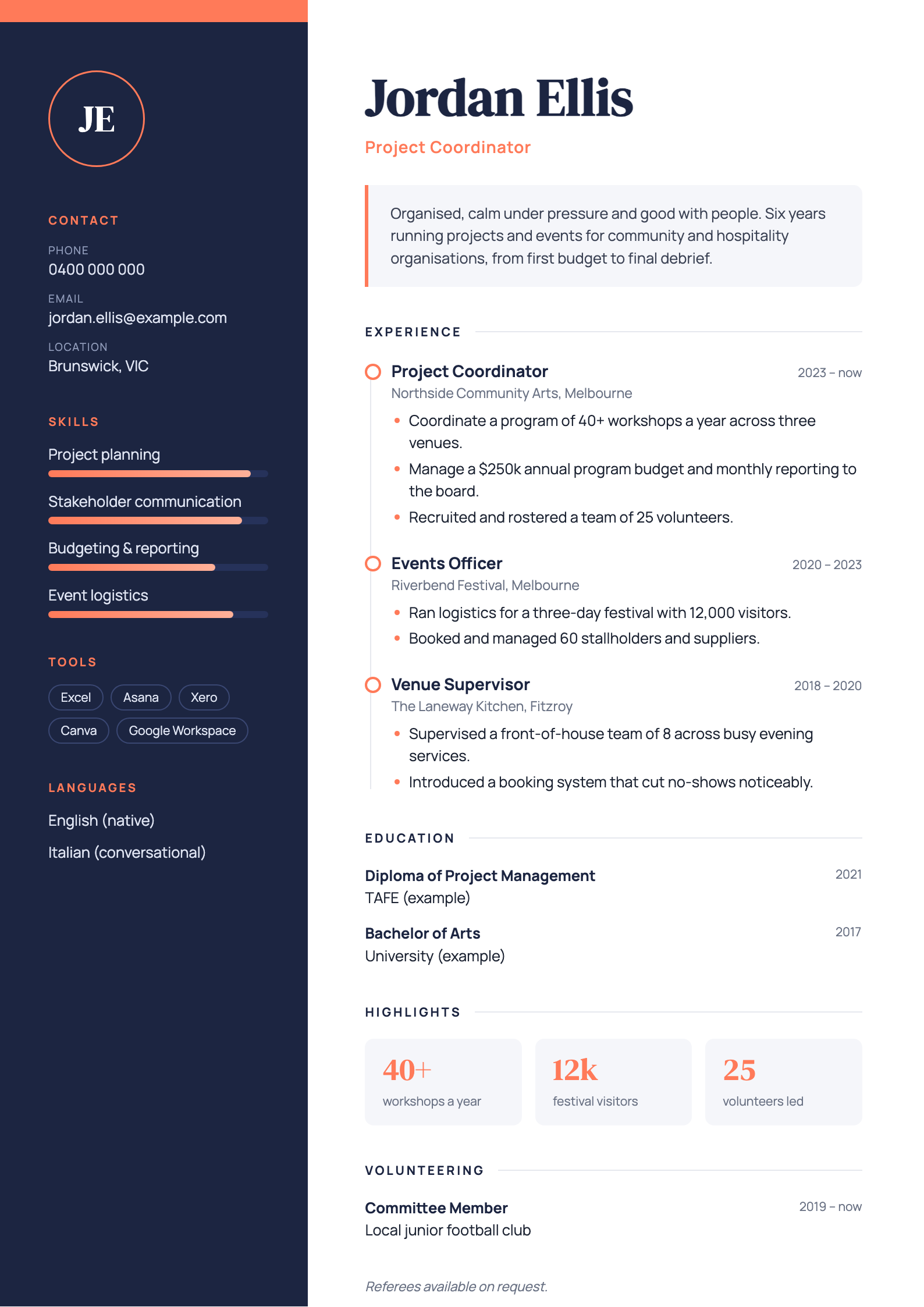
A one-page CV built as a web page. You can also open the real file in your browser and try printing it.
Step 1: Gather what goes on it
Before you open the AI, get your information together in one place. Your old CV is perfect if you have one, even if it's out of date. A copy of your LinkedIn profile works too. If you have neither, write rough notes in any order: jobs with dates, what you did in each, qualifications, skills, and how people should contact you.
It doesn't need to be well written yet. The AI can help tidy the wording. What it can't do is know your history, so the facts have to come from you.
Step 2: Ask for the CV
Open Claude or ChatGPT. The free versions are fine for this.
Copy the message below, fill in the parts in square brackets, and paste your information at the bottom where it says to.
Please create my CV as a single HTML file I can open in a web browser
and save as a PDF.

The look I want: [describe it, e.g. "clean and modern, with a dark blue
strip down the left side for my contact details and skills, and my work
history on the right"].

Please:
- Fit it on [one / two] A4 pages when printed.
- Use a font that is easy to read.
- Keep all the styling inside the one file.
- Only use the information I give you. Don't add or exaggerate anything.
- If something important seems to be missing, ask me instead of
  making it up.

Here is my information:
[paste your old CV, LinkedIn profile or notes here]
That line about not adding anything matters. AI tools sometimes "improve" a CV by inventing achievements or rounding up job titles, and you don't want to find that out in an interview.
Step 3: Look at it
Both Claude and ChatGPT can usually show you the finished page right there in the chat. In Claude it normally opens in a panel beside the conversation. In ChatGPT, look for a "Preview" button near the code. If you see a big block of code instead of a CV, just ask "Can you show me a preview of this?"
If you can't get a preview, you can still open it on your own computer. Copy all of the code, then do this.
On a Windows computer, open Notepad, paste the code in, then choose File, then Save As. Change "Save as type" to "All files" and call it cv.html.
On a Mac, open TextEdit. Before pasting, click the Format menu and choose "Make Plain Text". That step matters, because otherwise TextEdit quietly saves it as a document instead of a web page. Paste the code, save it, and call it cv.html. If it asks whether to use ".html", say yes.
Now double-click the file. It will open in your web browser, looking just like a web page, except the web page is your CV.
Step 4: Change anything you don't like
This is where it gets good. You don't need to know how any of it works. You just say what you want, in the same words you'd use with a person.
"Make my name bigger." "Move the skills section above education." "The blue is too bright, make it navy." "Put the dates on the right-hand side, in grey." "It's spilling onto a second page, can you tighten it up so it fits on one?" "Add a small line between each job."
Each time, the AI gives you an updated version. If you're working from a saved file, replace the old code with the new code and open it again. Keep going until you're happy. Nothing you ask for is too small or too silly.
If a change goes wrong, say so. "That broke the layout, can you go back to the previous version?" works fine.
Step 5: Save it as a PDF
Employers want a PDF, not a web page, and your browser can make one for you.
With the CV open in your browser, press Ctrl + P on Windows or Cmd + P on a Mac to bring up the print window. Where it says "Destination" or "Printer", choose Save as PDF. Before you save, open "More settings" and check two things. Turn off "Headers and footers", or you'll get the date and a web address printed in the corners. Turn on "Background graphics", or your coloured sections will come out white.
Check the preview shows the right number of pages, then save. That PDF is your CV.
These instructions are for Chrome and Edge. Safari's print window looks a little different, but the same options are there under its settings.
A few things to watch for
Read every word before you send it. The AI is very good at layout and decent at wording, but it can still get a date wrong or slip in a phrase you'd never use. It's your name at the top.
Be careful how fancy you go. Lots of employers, especially big ones, run CVs through software that reads the text before a person ever sees it. Very complicated layouts can confuse that software, so if you're applying through a large company's job website, a simpler version is safer. You can ask the AI for both. "Can you make a plainer, single-column version of the same CV?" takes ten seconds.
Leave out things you don't need to share, like your date of birth, your full home address or a photo. Your suburb, phone number and email are enough.
Finally, keep the cv.html file, or keep the chat. Next time you need to update your CV, open it again and say "Add my new job at the top." That's much easier than starting from scratch.